Blog

Signatures in Tuxedo Webmail

When using webmail, you may want to have a signature automatically append to your messages.  These are the instructions for accessing/managing signatures in the Tuxedo Webmail,


To access your signature and set or change it follow these steps as shown in the screenshot below:
	1 - click on Settings on the bottom left
	2 - click on Identities at the top center of the screen.
	3 - click on your email address on the top left
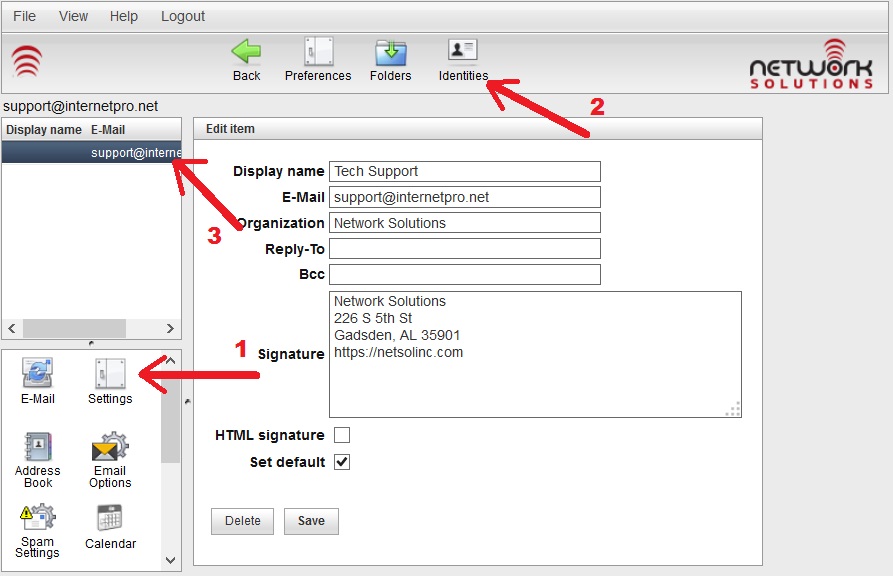
Signature1


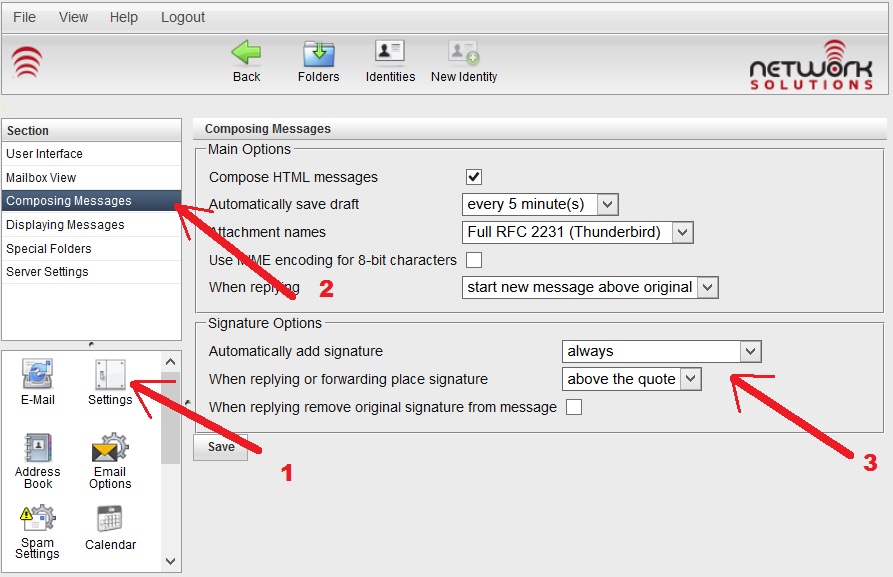
To set when your signature is used, follow these steps as shown in the screenshot below:
	1 - click on Settings on the bottom left
	2 - click on Composing Messages
	3 - set when you want your signature to be used
Signature2
2014-12-11T17:33:35-06:00December 11, 2014|Documentation|Comments Off on Signatures in Tuxedo Webmail

Whitelisting Emails in Webmail Lite

This documentation only applies if you are using the Normal with Quarantine template for spam filtering.  If you are using other templates, your spam messages will not be quarantined in the spam folder.
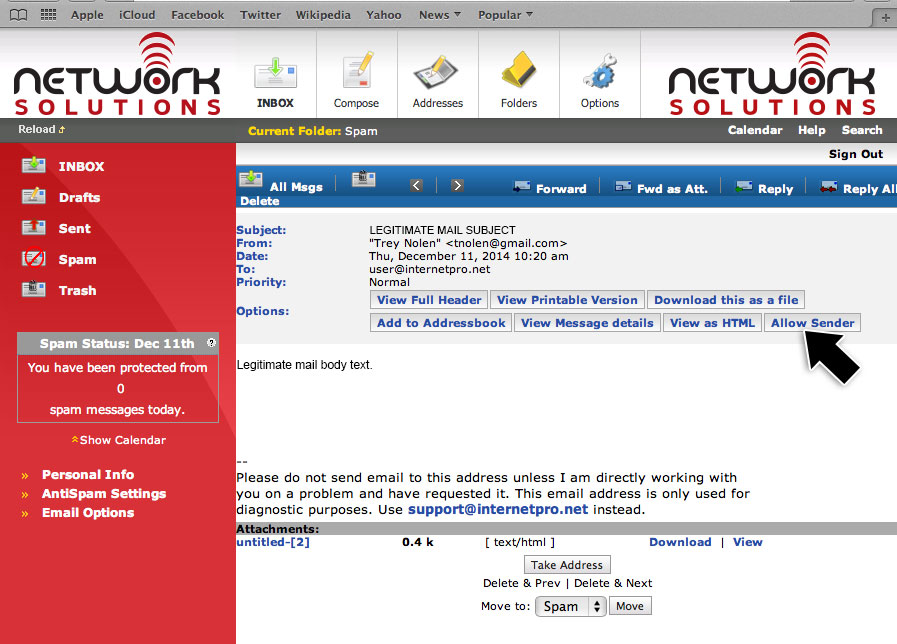
To add quarantined senders to your whitelist in Webmail Lite follow these steps:

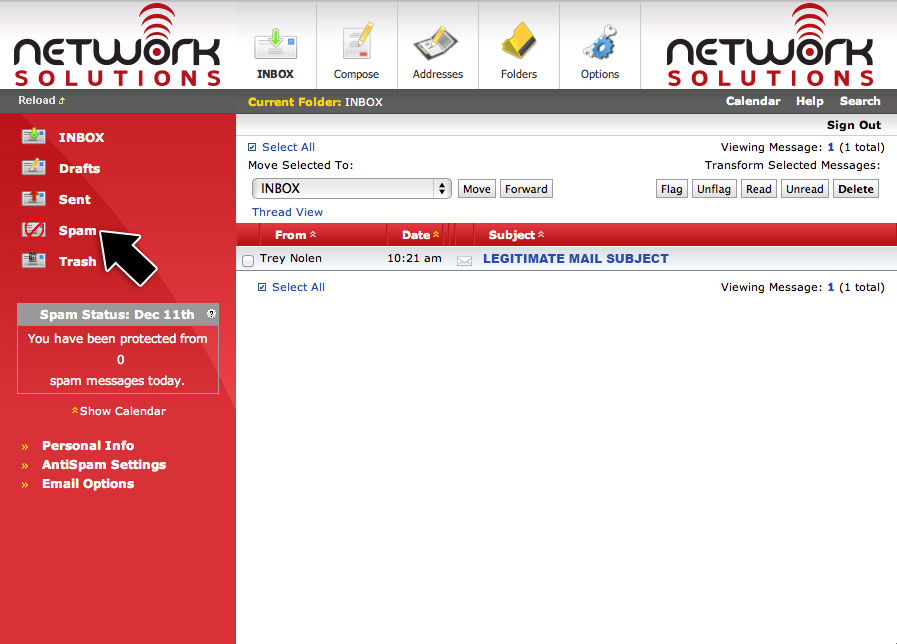
1) First, click the spam folder to show a list of messages which have been quarantined as spam.

legitimate-webmail


2)  Click the legitimate email to view it.   Above the body of the email, you will see an “Allow Sender” button as in the screenshot below.  Click that button.

legitimate-webmail2


That’s it!   The email will automatically be moved from the spam folder and back to your Inbox.  The sender of the email will be added to your personal whitelist, so that sender’s email will never be quarantined or blocked as spam again!


2014-12-11T19:56:51-06:00December 11, 2014|Documentation|Comments Off on Whitelisting Emails in Webmail Lite

Whitelisting Emails in Tuxedo

This documentation only applies if you are using the Normal with Quarantine template for spam filtering.  If you are using other templates, your spam messages will not be quarantined in the spam folder.
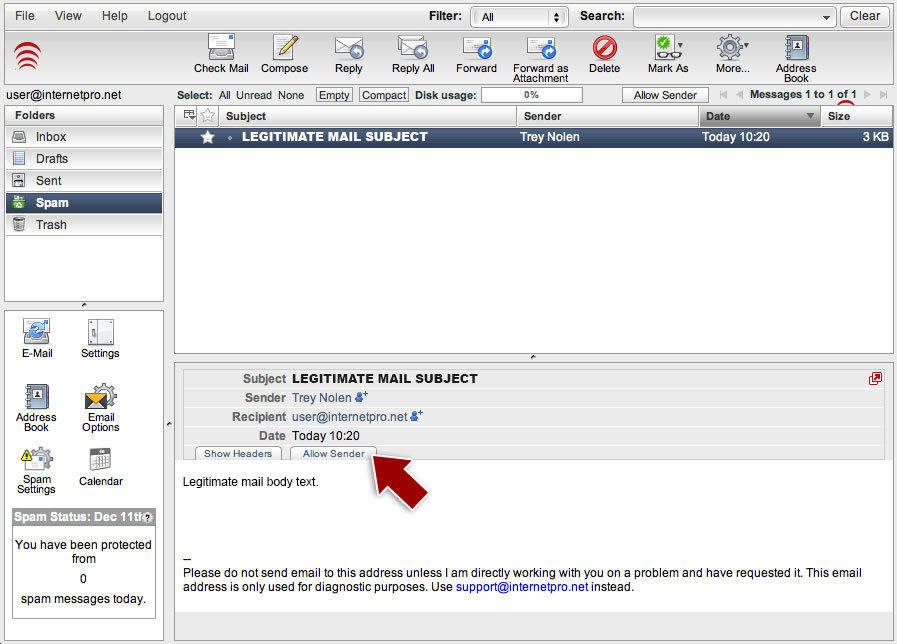
To add quarantined senders to your whitelist using the Tuxedo webmail, follow these steps:

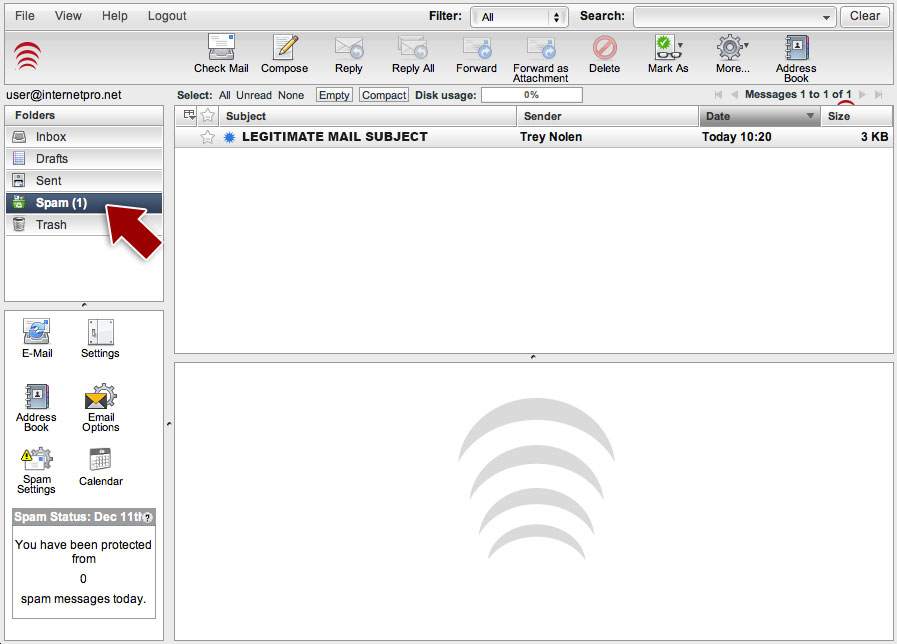
1) First, click the spam folder to show a list of messages which have been quarantined as spam.

legitimate


2)  Click the legitimate email to view it.   Above the body of the email, you will see an “Allow Sender” tab as in the screenshot below.  Click that link.

legitimate2


That’s it!   The email will automatically be moved from the spam folder and back to your Inbox.  The sender of the email will be added to your personal whitelist, so that sender’s email will never be quarantined or blocked as spam again!

2014-12-11T19:57:41-06:00December 11, 2014|Documentation|Comments Off on Whitelisting Emails in Tuxedo

Mail Server Migration

December 9, 2014 – 11:35am – The new mail server system is live.  We are still moving some of the more recent emails over to the new server, but things are coming online.  Please bear with us while this change happens!   Also, don’t forget to check out the informational post here for more background on what is going on.

Update:  Customers may see some older email come in again and may see some of their recent email disappear.  The recent email will come back shortly.  The old email is email that has been deleted since we synchronized the mailbox.   We have a LOT of data and mailboxes to sync so it is impossible to do them at one time.  There will be some time difference between the migration and they sync and changes made to the mailbox during that time may revert.  You should not LOSE any email – worst case is that you get email again that you have already dealt with.   This is a necessary evil but will pass shortly.

Update 2: We have determined that there is an issue with customers who have “aliased domains”.  This occurs when there two or more domain names which point to the same mailbox.  For instance, user@domain1.com and user@domain2.com are the same account.  Some companies own multiple domains and set up this type of arrangement.   If your company does this, you may have trouble authenticating to receive your email.   We are currently working to fix this issue.

Update 3:   The issue mentioned in Update 2 above should be fixed.   If you are seeing authentication problems, please let us know by calling 256-547-6817.   You should NOT be receiving “bad password” errors.

 Update 4: We do know that the webmail address books did not make the migration to the new server.  This was a known issue which we mentioned on this post.   Please let us know if you need us to help move your address book for you.

Update 5:  It has come to our attention that some Apple devices (iPhones and iPads) using IMAP did not automatically resume working as most devices did (everything else).   This has to do with the nonstandard way that Apple handles folder subscriptions.  The fix is to remove the IMAP account from the device and set it up again.


2014-12-10T13:30:29-06:00December 9, 2014|News and Updates|Comments Off on Mail Server Migration

New Email System

We are bringing the new email system online around 11:00am CST on 12/9/2014.   We are bringing it online during the day instead of during a maintenance window so that we can better troubleshoot issues while people are using their email instead of possibly missing messages in the middle of the night when people aren’t using the system.    Also, we’ll have a full staff available to address any problems which may arise.

Fundamental Change in Dealing with SPAM

The new system brings with it a fundamental change to the way we deal with spam.   In the past, we have tagged messages our system thought were spam with *****SPAM***** in the subject line.   The idea was to leave filtering of the spam to the end user.   However, as global spam volume has increased, people are wanting to just not see spam at all.  Also, devices such as phones and tablets have become more prevalent and those devices generally don’t have good filtering capabilities built in.   So, the new system will concentrate on just keeping spam out of your inbox completely.   Spam messages will now be rejected back to sender by default.

What This Means to You

You will now be able to maintain your own “whitelist” (list of email addresses whose email you always receive) and “blacklist” (list of email addresses you always block).  Using these lists, you will be able to “tweak” your Inbox so that you receive very little spam.   We are also providing templates which will allow you to be more or less aggressive in your spam blocking – more aggressive if you want a cleaner Inbox and less aggressive if you want to insure nothing is ever missed by accident.   You can also set up a “quarantine” which is like a server-side junk folder to hold email which our server thinks might be spam.   However, we recommend you only use this quarantine to perfect your rules so you no longer even have to check that folder.   Messages which are quarantined will automatically be removed by the server after 14 days.

Known Issues with Migration

We’ve been working hard to make the migration as seamless as possible and to minimize downtime.  However, with any large change like this, there will be some issues.  Some of those issues we know about and some will be unforeseen.  Issues we do know about are:

  1. Webmail-based address books aren’t going to automatically transfer over.  If you have a large address book stored in the webmail, please drop us a line at support@internetpro.net and we will move it for you.   Please let us know if the address book is stored in the webmail located at https://webmail.internetpro.net or the one at https://mail.internetpro.net (Legacy).
  2. There will be an increase in spam email when the server first comes online.   We have relaxed our spam rules so that we can address any delivery issues which may arise from the new server.  We will be tightening those rules again as soon as we are sure everything is running smoothly.   Please bear with us during this transition as it will be worth the trouble!


We will be continuing to post more updates and documentation as we get closer to the Go Live time, so please keep checking our website.


2014-12-08T18:07:25-06:00December 8, 2014|Documentation, Internet, News and Updates|Comments Off on New Email System

Comcast Outage

November 24, 2014 – 1:45pm – Comcast is experiencing a large outage in the Gadsden area.  It seems to be a non-local event so it is affecting the entire area.   We have made contact with Comcast, and they do not currently have an accurate estimated time to repair (ETR).  Right now, we just have the generic automatic ETR of 5:56pm.   We’ll be posting updates here as quickly as we get them.

Our phones were also affected by this event, but we have now rerouted our voice traffic so our phones are back up.   We are returning calls as quickly as possible.

 Update 3:25pm –  No real update we’re afraid.  Repeated calls to Comcast reveal that the issue is still unknown.   The estimated time to repair remains the initially generated time of 5:56pm.  For a nice map detailing the nationwide issues Comcast is experiencing, go here:  https://downdetector.com/status/comcast-xfinity/map/


Update 3:50pm – It looks like Comcast has come back up and has been stable for about 10 minutes.   Hopefully, the outage is over.


2014-11-24T21:53:48-06:00November 24, 2014|News and Updates|Comments Off on Comcast Outage

Email Server News

November 18, 2014 – We are preparing for a complete overhaul of our email system which is going to bring a lot of great new features!  We will be making a detailed announcement outlining the new features soon.  In the mean time, we are having to do some work on the existing mail server system to prepare for the migration to the new system.   This in conjunction with the large volume of email being processed daily, is causing some delays in email delivery.   We are aware of the issue and and are trying to minimize it, but it cannot be eliminated right now.   The existing mail hardware is getting a little long in the tooth and that is also contributing to the delays.   Please bear with us as we work to modernize and improve the email system.

We think you’ll be really happy with the new system, as it will be bringing several things like:

  • Improved webmail
  • Improved spam settings and filters including user-specific settings and templates
  • Improved speed
  • Many other features which we will be announcing shortly


We do apologize for any inconvenience this may cause and appreciate your patience as we work to bring you improved services.


2014-11-18T16:33:12-06:00November 18, 2014|News and Updates|Comments Off on Email Server News

NetSol Cloud Desktop Client Updated

November 7, 2014 – We are pleased to announce a new release for the desktop sync client for NetSol Cloud.   This is a major release that brings a lot of new features.  First, it better supports the features introduced in our last major update of NetSol Cloud including the new file sharing.  The new client also now comes with overlay icons in the popular file managers on the supported platforms.  The icons visualize the sync and sharing status of the synced files on the desktop.

Another huge new feature of the new client is the “selective sync”.   Now, within a synced folder, subfolders can be excluded from the client synchronization.  For example, if you sync “My Documents” but have a subfolder inside  My Documents that you don’t want to sync, you can now do t hat.   This makes syncing of large data sets much easier to customize.

This release also brings several smaller improvements which make syncing faster and more reliable.

We do recommend that you upgrade to the new version which you can find on our Desktop Sync Client Page.
If you have any questions or concerns regarding this new release, please contact us at support@internetpro.net.


2014-11-07T15:38:19-06:00November 7, 2014|NetSol Cloud, News and Updates|Comments Off on NetSol Cloud Desktop Client Updated

Comcast Outage

The Comcast circuit at our office went down at approximately 7:10 PM affected some services and the downtown area of Gadsden. Technicians responded to the outage and arrived onsite shortly after to begin troubleshooting the issue. After working with Comcast support we were notifed that the outage was due to a failed node in the Comcast backbone and were given an ETA to repair for 11:12 PM. Currently our monitoring systems have notified us that the circuit is back online and all services have been restored as of 8:24 PM. We will continue to monitor the circuit and will post any updates.

2014-10-25T01:34:40-05:00October 25, 2014|News and Updates|Comments Off on Comcast Outage

NetSol Cloud Desktop Client Updated

October 23, 2014 – We are happy to announce a new update for the NetSol Cloud desktop client.  This is version 1.6.4 and it introduces some important fixes to the last version.  Updating is strongly recommended.   Changes:

  • Fix logic dealing with application startup
  • On Windows, fix overflow when computing the size of a file larger than 4GB
  • Avoid data corruption due to wrong error handling
  • Improve timeout handling to reduce the number of timed out jobs


If you have any questions or need help upgrading, please contact support@internetpro.net.


2014-10-23T18:26:54-05:00October 23, 2014|News and Updates|Comments Off on NetSol Cloud Desktop Client Updated
Go to Top